AI-Powered Error Classification
Understand test failures faster and reduce time spent debugging. Modern test automation generates thousands of results across devices, browsers, and environments.
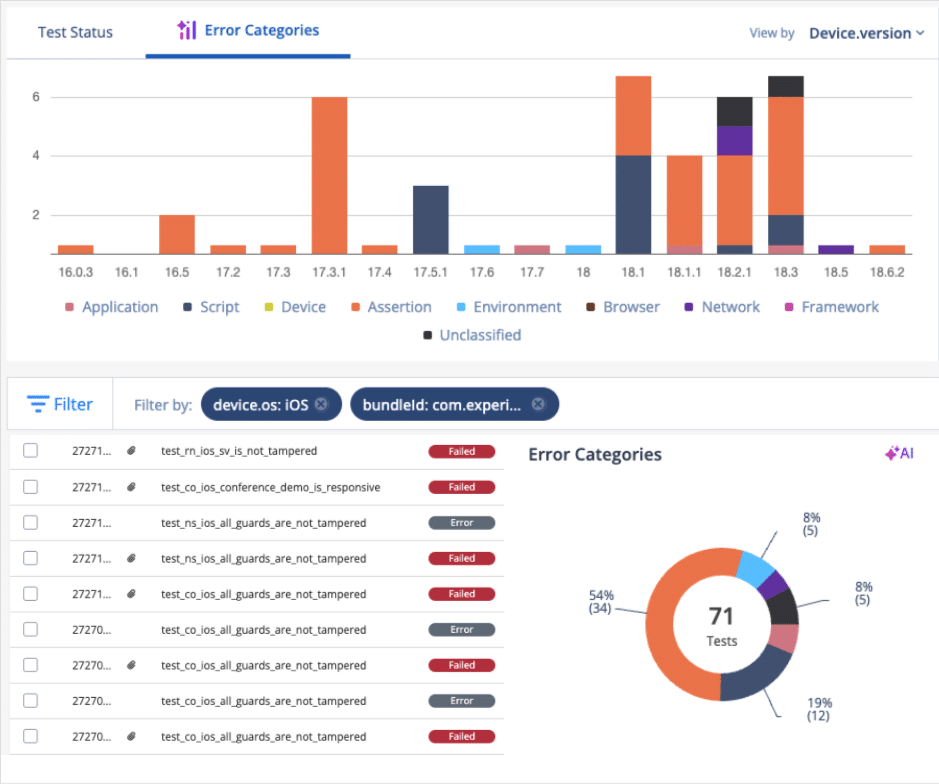
AI-Powered Error Classification helps teams quickly identify why tests failed by automatically grouping failures into meaningful root-cause categories.
- Analyze failures across iOS, Android, and cross-browser testing environments
- Separate product defects from script, device, network, or environment instability
- Reduce manual triage and focus teams on the failures that matter most
Request a Demo
Trusted by Enterprise Customers


Reduce Noise Across Test Execution
Large-scale automation across iOS, Android, and desktop browsers can generate thousands of test results every day. As execution volume grows, teams spend more time reviewing logs and investigating whether failures came from the application, unstable scripts, devices, browsers, or infrastructure.
Without clear visibility into failure causes, debugging can quickly become a bottleneck for release teams.
Identify Patterns and Trends Over Time
Track failure trends to better understand how issues evolve over time.
Visual reporting and categorized failure insights help teams quickly identify unstable environments, recurring infrastructure issues, or application-level defects impacting release confidence, helping organizations make faster and more informed release decisions without manually reviewing every failed test.
Essential Capabilities for Testing

Test Native, Hybrid and Web Apps
Ensure seamless performance and functionality by testing native, hybrid, and web apps across various devices

Non-Functional Testing
Cover performance, accessibility, and security scenarios directly on devices.

Network Logs & Traffic Analysis
Inspect network calls, latency, and API responses to debug performance issues.

Device Logs & Crash Analysis
Capture OS-level and app-specific logs to diagnose crashes and errors quickly.

Biometrics & Sensor Testing
Validate fingerprint, Face ID, GPS, camera, and other device sensors to ensure real-world usability.

Interrupt Testing
Simulate calls, SMS, push notifications, and battery conditions to see how apps handle real interruptions.
Customer Success Story
1,300
Builds Automated per Cycle
36%
Test Coverage Increase

The implementation of Digital.ai Testing has allowed us to accelerate delivery across all teams.
Géraldine Chaumont
Test Lead

Choose the Right Deployment for Your Team
On-Premises Lab
Deploy a fully air-gapped testing lab on-premises, with enterprise-grade features intact.

Private Real Device Cloud
Secure 24/7 access to dedicated iOS & Android devices and Cross Browsers in a private cloud.

Hybrid Deployment
Combine the best of cloud scalability and on-premises control with a flexible hybrid model.