iOS Testing Across the Apple Ecosystem
Test iOS apps on simulators, real devices, shared and private environments—from mobiles apps to in-car experiences like Apple CarPlay.
Digital.ai provides a unified platform that helps development and QA teams validate iOS apps across devices, operating system versions, and real-world conditions.
The iOS Testing Landscape
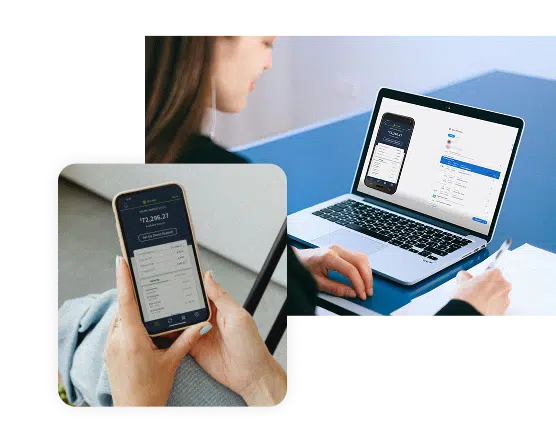
iOS testing spans a wide range of applications, environments, and user experiences. Teams build software not only for iPhones and iPads, but also for browsers and connected systems like cars.
Each environment introduces different testing needs, from validating UI interactions to analyzing performance under real-world conditions.

Native & Hybrid Apps
Applications built with native iOS frameworks or hybrid technologies that combine native and web components.

Mobile Web on Safari
Web applications accessed through iOS browsers, where layout, performance, and device behavior must remain consistent.

iPhone & iPad Devices
Testing across different device models, screen sizes, and operating system versions to ensure reliable user experiences.

In-Car Experiences
In-Car Experiences
Applications designed for automotive environments such as Apple CarPlay, where usability, responsiveness, and safety considerations are critical.
How Teams Approach iOS Testing Today
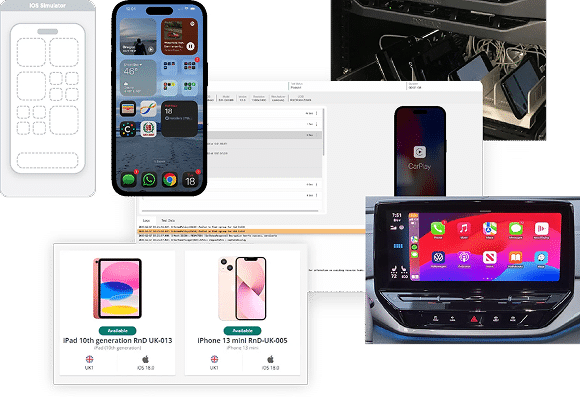
Different stages of development require different testing approaches. Teams may use simulators for rapid feedback, real devices for validating user interactions, and shared or dedicated environments to support testing at scale.
Digital.ai brings these approaches together in a unified platform, allowing teams to test iOS applications using the environments that best fit their workflows.
iOS Simulators
Simulators provide a fast way for developers to validate
application logic, UI behavior, and early-stage functionality during development.
Real iOS Devices
Testing on real iPhones and iPads helps teams validate
gestures, performance, audio, and hardware-level interactions that occur in real-world usage.
Shared Device Pools
On-demand access to real iOS devices that remain configured with the apps and environments teams need.
This gives teams the flexibility of public devices cloud with greater control in a single platform.
Dedicated Environments
Dedicated device pools provide consistent access to specific devices for teams that require guaranteed availability, specialized configurations, or controlled environments.
Apple CarPlay
Automotive teams can validate iOS applications designed for in-car systems such as Apple CarPlay, ensuring apps behave reliably in automotive interfaces and connected environments.
Built for Every Role Involved in iOS Quality
Delivering reliable iOS applications requires collaboration across developers, testers, and engineering leaders. Each role interacts with the platform differently throughout development and release.
iOS Developers
Developers can validate application logic, debug issues, and test new features across simulators and real devices without managing device infrastructure or changing their workflows.
Manual Testers
Manual testers can explore user flows, gestures, and device behavior across different iOS versions and hardware models to ensure applications behave as expected.
Automation Engineers
Automation engineers can develop and run tests using existing frameworks while scaling execution across devices and CI/CD pipelines.
QA Leaders & Managers
QA leaders gain centralized visibility into test execution, device usage, and release readiness across teams and projects.

What You Can Test Across iOS
iOS applications must work reliably across different application types, devices, and usage scenarios. Teams need to validate not only functionality, but also how apps behave under real-world conditions.
Digital.ai supports testing across a wide range of iOS application environments and quality focus areas.
APP TYPES

Native Apps
Applications built specifically for iOS using Apple development frameworks.
Hybrid Apps
Apps that combine native capabilities with web technologies.

Mobile Apps
Web applications accessed through iOS browsers such as Safari.
FOCUS AREAS

Functional Testing
Verify that application features behave correctly across devices, OS versions, and user workflows.

Performance Testing
Analyze how applications perform on real devices, including network activity, resource usage, and responsiveness.

Accessibility Testing
Ensure applications meet accessibility requirements and provide usable experiences for all users.
REAL-WORLD CONDITIONS

Network Logs & Traffic Analysis
Inspect network calls, latency, and API responses to debug performance issues.

Device Logs & Crash Analysis
Capture OS-level and app-specific logs to diagnose crashes and errors quickly.

Biometrics & Sensor Testing
Validate fingerprint, Face ID, Camera, and other device sensors to ensure real-world usability.
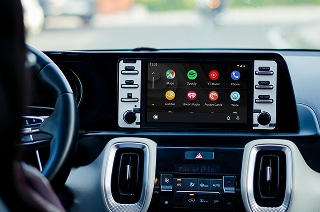
Beyond Mobile – iOS in the Car
Test iOS applications designed for in-car experiences like Apple CarPlay.
Ensure apps behave reliably while supporting safe driver experiences.
Deployment Options That Fit Your Organization
Different organizations have different requirements for infrastructure, security, and control. Digital.ai supports flexible deployment models so teams can test iOS applications in environments that match their operational needs.

On-Premises Lab
Deploy a fully air-gapped testing lab on-premises, with enterprise-grade features intact.

Private Real Device Cloud
Secure 24/7 access to dedicated iOS & Android devices and Cross Browsers in a private cloud.

Hybrid Deployment
Combine the best of cloud scalability and on-premises control with a flexible hybrid model.