Published: August 26, 2026
Parallel Testing Done Right: Why Your Pipeline Fails (And How to Fix It)

Every QA tester knows the crushing feeling of watching an automation suite grow over time. What starts as a nimble 5-minute smoke test gradually evolves into a sprawling 2-hour execution run. Each new feature brings a handful of additional Appium mobile scripts or Selenium browser flows; before long, developers are tapping their feet, release managers are asking for updates, and QA is quietly branded with an uncomfortable label: the delivery bottleneck.
So you open your test framework configuration, spot the settings for concurrent execution, and think: “Why not?”
You flip the switch and run the suite again. What should be a speed boost turns into a build covered in inexplicable failures.
Three hours later, you re-run the exact same commit. It passes. You wait for the next build. Two other tests fail. You wonder if you’re losing your mind.
You haven’t actually sped up your pipeline. You’ve built an expensive, high-speed random failure generator.
The Problem: The Myth of the Parallel Switch
A big misconception in modern test automation is that moving from sequential testing to parallel testing is just a simple configuration tweak. It isn’t; it’s a fundamental architectural shift.
When you run tests sequentially, they behave like polite drivers on a single-lane road. One test executes, cleans up after itself, and steps aside so the next can start. Everything stays orderly because only one thing happens at a time.
When you flip the parallel switch without refactoring your underlying test suite, you take those same drivers, drop them onto a chaotic four-lane highway without traffic lights, and wonder why there’s an immediate pileup.
Suddenly, tests that passed reliably when run one at a time start randomly failing now that they’re running in parallel, with cryptic element timeouts, broken driver connections, or unexpected session terminations. You re-run the build in Jenkins, and those failed tests pass. Three other tests fail instead. Welcome to the Heisenbug.
Why It Fails: The Four Culprits
Why do tests that pass with flying colors when triggered sequentially go haywire the moment you run them in parallel? It almost always comes down to one principle: tests stepping on each other’s toes.
Research into test flakiness classifies these failures into distinct categories. According to a literature review published at the 37th IEEE/ACM International Conference on Automated Software Engineering (ASE ’22), flaky tests generally fall into three origins: test-based flakiness (faulty scripts, unstable identifiers, async waits, order-dependent tests), environment-based flakiness (network conditions, resource contention, multi-environment conflicts), and product-based flakiness (race conditions and memory leaks in the application itself). The four culprits below are practical, everyday manifestations of these categories in a parallel test suite.
Data Collisions: Two Tests, One Record
Imagine two people editing the exact same spreadsheet cell simultaneously. If Test A updates a user profile (user_id: 101) while Test B concurrently deletes user_id: 101, one of them will crash. Neither test was written incorrectly; they simply collided over the same piece of data.
In a parallel world, this collision happens at scale. A team running many tests concurrently against a shared staging database is very likely to hit this wall sooner or later.
Driver Leaks: Sharing the Remote Control
Whether controlling a browser with Selenium or a mobile app with Appium, your script needs its own dedicated driver session. A common pitfall is accidentally sharing a static driver across threads:
// Anti-pattern: Shared driver across parallel threads
public static WebDriver driver;
@Test
public void testA() {
driver.get(“https://example.com”);
driver.findElement(By.id(“submit”)).click();
}
@Test
public void testB() {
driver.findElement(By.id(“username”)).sendKeys(“admin”);
// Oops: testA might be on a different page right now
}
It’s like two people fighting over a TV remote; one worker switches the page while the other is mid-click. Chaos.
Even in Playwright, failing to isolate BrowserContext instances lets cookies and login sessions bleed across concurrent tests:
// Anti-pattern: Shared context in Playwright
const sharedContext = await browser.newContext();
// Multiple tests use sharedContext; sessions overlap
The fix: use ThreadLocal (Java) or context isolation per worker (JavaScript/Playwright).
BDD State Pollution: The Cucumber Trap
Frameworks like Cucumber are brilliant for writing tests in plain English. However, automation engineers often store scenario state in global variables:
// Anti-pattern: Shared step state in Cucumber
public static User loggedInUser;
@Given(“a user is logged in”)
public void userLoggedIn() {
loggedInUser = new User(“alice@example.com“);
}
@When(“the user places an order”)
public void placeOrder() {
// Thread A might have just overwritten loggedInUser
}
When run in parallel, Thread A silently overwrites loggedInUser while Thread B is halfway through checking an order page, triggering random assertion errors. The solution: use Dependency Injection (PicoContainer, Spring) so each scenario instance owns its own state objects.
The “Leftover” Trap: Orphaned Data and Devices
The absolute worst culprit for parallel pipeline failures is missing cleanup. When a test crashes mid-run, it skips its teardown and leaves behind “orphaned data”: a locked shopping cart, a duplicate email address, or a device that isn’t properly reset before the next test claims it.
This applies to physical and virtual test devices as well as data. On a shared device grid, a test that doesn’t clean up after itself (leftover app state, cached credentials, stale app installs) can silently corrupt the next test that lands on that device. Digital.ai Testing’s Appium best practices guide addresses this directly, covering independent test methods, avoiding static variables, and proper driver management across parallel runs, paired with device cleanup between sessions to keep the grid in a known-good state.
In a sequential world, you might get away with leaving a mess behind because the next test looks at something else. In a parallel world, another worker thread lands on top of that mess three seconds later and breaks. This cascades; one sloppy test can trigger failures across several downstream tests.
The Cost: Flakiness as a Hidden Tax
When a parallel test suite becomes unstable, the damage extends far beyond red indicators on a dashboard. It fundamentally undermines team culture and drains resources.
The Probability Compounding Math
Consider the math of a parallel pipeline. If a UI test suite has a tiny 1% flake rate, running 50 of those tests sequentially gives you a decent chance of seeing a green build.
However, when those 50 tests are distributed across 8 parallel workers running concurrently, that 1% flake rate compounds. This is basic probability, not a measured industry statistic; it’s illustrative math to show why flakiness gets worse, not better, as you parallelize:
| Parallel Workers | Cumulative Pass Rate | False-Failure Rate |
| 1 (sequential) | 99.5% | 0.5% |
| 2 | 98.0% | 2.0% |
| 4 | 96.1% | 3.9% |
| 8 | 92.3% | 7.7% |
| 16 | 85.2% | 14.8% |
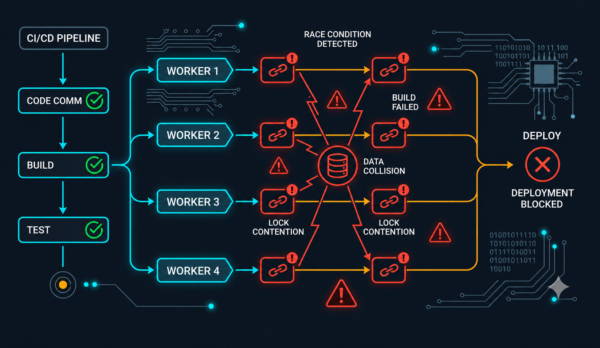
The cascade: Multiple workers trigger race conditions (data collisions, lock contention, orphaned sessions), causing a build to fail even though no code is broken. Developers re-run until they hit a lucky green combination.
Alert Fatigue and the Re-Run Culture
When a suite fails randomly, engineering teams suffer from alert fatigue. As the ASE ’22 literature review on test flakiness notes, junior developers in particular “tend to disregard flaky test cases or keep repeating them until they pass, allowing potentially dangerous flaws to go unreported.” The same research points out that investigating the root cause of flakiness is time-consuming, and that cost is wasted entirely if the flakiness turns out to be a false alarm; a dynamic that discourages teams from digging in and encourages the “just re-run it” habit instead.
Every re-run of a parallel suite consumes real compute time and cloud grid budget. The exact cost varies by team size, suite length, and infrastructure pricing, but the direction is predictable: teams that don’t fix the underlying isolation problems tend to pay repeatedly, in both engineering time and infrastructure spend, for a problem that isolation would have prevented.
The Patterns: Building Isolated Test Worlds
To stop parallel tests from fighting, you have to stop them from sharing. Every test executor needs to operate inside its own private bubble.
Ephemeral Infrastructure: The Container Pattern
Instead of pointing all parallel workers at a single staging database, modern teams use short-lived environments with containerization. Using Docker, you can spin up a dedicated, isolated database container per worker thread on the fly, tearing it down as soon as the test finishes. Kubernetes-based CI runners extend this further, scheduling entire disposable test environments per pipeline run.
For mobile and web testing at scale, Digital.ai Testing provides a real device cloud grid for running Appium, Selenium, and cross-browser tests in parallel, with device cleanup between sessions so the next test starts from a known-clean state rather than inheriting leftover app data or configuration from the previous run.
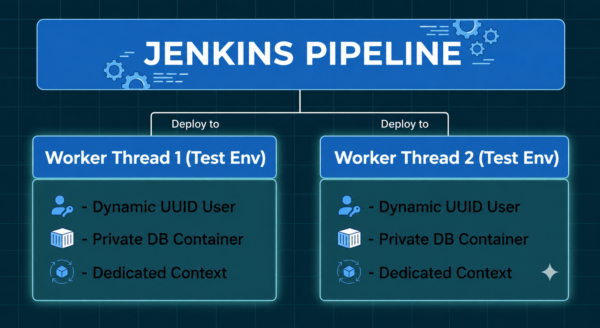
Each worker thread in your Jenkins pipeline receives its own isolated environment: dynamic UUID-based test users, private Docker database containers, and dedicated browser/device contexts.
Browser & Device Context Zoning
For Selenium, the solution is thread-safe driver allocation:
// Pattern: ThreadLocal driver isolation
private static final ThreadLocal<WebDriver> driverThread = new ThreadLocal<>();
public static WebDriver getDriver() {
if (driverThread.get() == null) {
driverThread.set(new ChromeDriver());
}
return driverThread.get();
}
@AfterMethod
public void tearDown() {
WebDriver driver = driverThread.get();
if (driver != null) {
driver.quit();
driverThread.remove();
}
}
For Appium, ensure your grid dynamically provisions pristine, unshared device instances per thread. Each worker should have its own AppiumDriver session with a unique sessionId, and the underlying device should be reset before the next session claims it.
This is exactly the kind of device hygiene that Digital.ai Testing is built to support: your test script is responsible for calling quit() at the end of every session, and the platform backs that up with its own automated device cleanup cycle between sessions, so the next parallel worker always gets a known-clean device regardless of how well any individual test cleaned up after itself. Combined with the guidance in Digital.ai Testing’s parallel execution best practices on avoiding static variables and keeping test methods independent, this keeps every device in a known-good state between runs.
In Playwright, embrace BrowserContext objects: each context acts like an isolated incognito window, so tokens and storage never bleed across concurrent runs.
// Pattern: Isolated Playwright context per test
const browser = await chromium.launch();
const context1 = await browser.newContext();
const context2 = await browser.newContext();
// Each context has its own cookies, localStorage, sessionStorage
Synthetic Data Generation: The UUID Shield
How do you prevent data collisions without complex database resets? One reliable approach is using runtime-generated unique identifiers (UUIDs) so parallel workers run simultaneously against the same environment without ever touching the same record.
// Pattern: UUID-based synthetic data
@Test
public void testCheckout() {
String uniqueUserId = UUID.randomUUID().toString();
User user = new User(uniqueUserId + “@example.com“, uniqueUserId);
// Thread A uses user-a1b2c3d4@example.com
// Thread B uses user-x9y8z7w6@example.com
// No collisions
}
By combining synthetic data generation with ephemeral, self-cleaning environments, teams eliminate test dependencies entirely. Tests no longer fight over shared state; each runs against its own dynamically-created, clean dataset. For a deeper look at building this kind of pipeline, including AI-generated test data and automated environment cleanup, see A Dev’s Guide to Synthetic Data Generation and Self-Cleaning Test Environments.
The Playbook: A Minimal Roadmap
Refactoring a legacy suite for parallel execution doesn’t require a massive rewrite. Four steps, in order:
- Audit state management. Replace static fields and shared drivers with thread-safe patterns: Dependency Injection for Cucumber, ThreadLocal<WebDriver> for Selenium/Appium, isolated BrowserContext instances for Playwright. Confirm devices and browser instances are properly cleaned between sessions.
- Balance the workload. Use test-duration history from your CI system to distribute heavier tests earlier, so all workers finish around the same time instead of one worker carrying the load.
- Quarantine, then scale incrementally. Tag brittle or rate-limited tests to run sequentially. Start with a small number of parallel workers, fix any race conditions that surface, then scale up.
- Validate and iterate. Track false-failure rate and build time as you scale. A falling re-run rate is a good sign the suite is actually getting healthier, not just faster.
- Looking Ahead: From Gatekeeper to Velocity Enabler
Looking Ahead: From Gatekeeper to Velocity Enabler
For years, QA was viewed as the final gatekeeper: the team holding up releases while automated suites slowly ground through their scripts. The perception was that testing slowed down engineering.
By fixing the underlying architecture of your test suite (isolated test data, thread-safe session management in Selenium, Playwright, or Appium, and properly cleaned devices on your test grid), parallel testing can transform that perception. A suite that once took hours can return reliable feedback in minutes, once it’s actually safe to run at scale.
The future of testing isn’t just about running more tests faster. It’s about running them correctly—with isolation, clean environments, and confidence in the results.
References & Further Reading
- Digital.ai Testing: Parallel Tests – Best Practices: official guidance on independent test methods, avoiding static variables, parallelism and logging, and thread-safe driver management for Appium.
- A Dev’s Guide to Synthetic Data Generation and Self-Cleaning Test Environments: building ephemeral, self-cleaning test environments with synthetic data.
- Ngo, K., Nguyen, V., & Nguyen, T. (2022). “Research on Test Flakiness: from Unit to System Testing.” 37th IEEE/ACM International Conference on Automated Software Engineering (ASE ’22). A literature review classifying flaky tests into test-based, environment-based, and product-based origins, and surveying academic and industrial tools for detecting and repairing them.
- Selenium WebDriver Documentation: official Selenium docs on driver sessions and browser automation.
- Selenium: Fresh Browser Per Test: official Selenium guidance on test isolation practices.
- Playwright: Isolation (Browser Contexts): official documentation on how Playwright uses BrowserContext for test isolation.
- The Test Pyramid: Martin Fowler’s foundational reference on test isolation and scope granularity.
- Digital.ai Testing: Scalable Mobile & Web Cross-Browser Testing Cloud: enterprise infrastructure for parallel execution across real iOS/Android devices and browsers.
You Might Also Like

First to Market with iOS 27 Support — But It Means More Than Being First
When the official iOS 27 release dropped, Digital.ai Testing was…

Secure and Test Your App on iOS 27 from Day One
Mobile apps are the key to your kingdom. They connect…

The Trust Problem in AI Test Failure
In Stack Overflow’s 2025 Developer Survey, 84% of developers said…