Published: May 15, 2026
From App Store to Clone: How AI Turns Your .ipa Into a Blueprint

AI – Accelerating Reverse Engineering
Every iOS app you ship to the App Store is a compiled binary. It is stripped of your comments, your variable names, your architecture diagrams, and your documentation. For decades, that compilation step felt like a meaningful barrier. Reverse engineering was hard. It required specialists, weeks of work, and a tolerance for reading ARM assembly. Specialists had to spend hours debating Ghidra vs IDA before they could even start.
That barrier is gone.
When I asked an AI model to write this paragraph, it talked about how a free AI subscription can completely replace senior security researchers for reverse engineering iOS applications. It’s not there yet, but I successfully took a small, compiled iOS application and built a full clone of the application as brand-new source code with the same functionality in a few hours.
This blog walks through exactly how that happens and shows that static analysis protections work against this AI app cloning.
How AI-Assisted Reverse Engineering Works
To understand the threat, you first need to understand what a compiled iOS binary contains.
An iOS app is distributed as a Mach-O executable inside an .ipa archive. The compiler strips your source code, but it cannot strip everything. Swift and Objective-C runtimes depend on metadata that survives compilation by design: class names, method names, property names, protocol conformances, and type information. On top of that, strings that contain API endpoint URLs, error messages, key names, and log output are stored in plaintext in the binary data segments. Linked frameworks are visible in the load commands.
The traditional reverse engineering toolchain that includes otool, strings, Ghidra, llvm-nm and many other tools have existed for years. What it produces is raw: symbol dumps, disassembly listings, hex views. Useful to an expert, opaque to everyone else. You still have to read assembly to work with disassembly and most software developers don’t like reading assembly.
The AI layer changes the model. Agents will run command line reverse engineering tools automatically. Extract symbols, strings, and assembly information and can start drawing conclusions about the behaviors. The agent could jump straight from IPA file to design documents. Then another team of agents can take design documents and implement an application or add copied features into an application.
The IP Theft Risk — What’s Actually Exposed
Business logic is encoded in symbol names. Your class names, method names, and property names are your product decisions made concrete. They describe what your app does, how it’s structured, and what problems it solves. In a release build, many of these survive verbatim. Proprietary algorithms, client-side API, and critical business logic exist in the final application. A competitor or an imitation doesn’t need your source code.
Case Study: Cloning Job Dispatcher from a Single .ipa
To make this concrete, I applied this methodology to a real iOS app called Job Dispatcher. It’s one of our sample apps that has a login screen, displays some tasks for a technician, can display weather, and open a map to get directions. The source code is available at https://github.com/digitalai-opensource/job-dispatcher and I’ve also used this app to show reverse engineering using Ghidra at https://digital.ai/catalyst-blog/ios-binary-modification/. Surprisingly, cloning the entire app was less work than using Ghidra to bypass some of the authentication.
I started with just the .ipa file with an end goal to build Swift source code of an equivalent application. I got there in a few hours and minimal human intervention. It would have taken less time, but the agent searched through the src directories on my machine and found the original source code so I had to start over.
Methodology
1. Prompt to generate architecture diagrams using only the compiled binary files. This gave 6 diagrams, but these 2 examples will show the important pieces. These diagrams are pretty accurate.
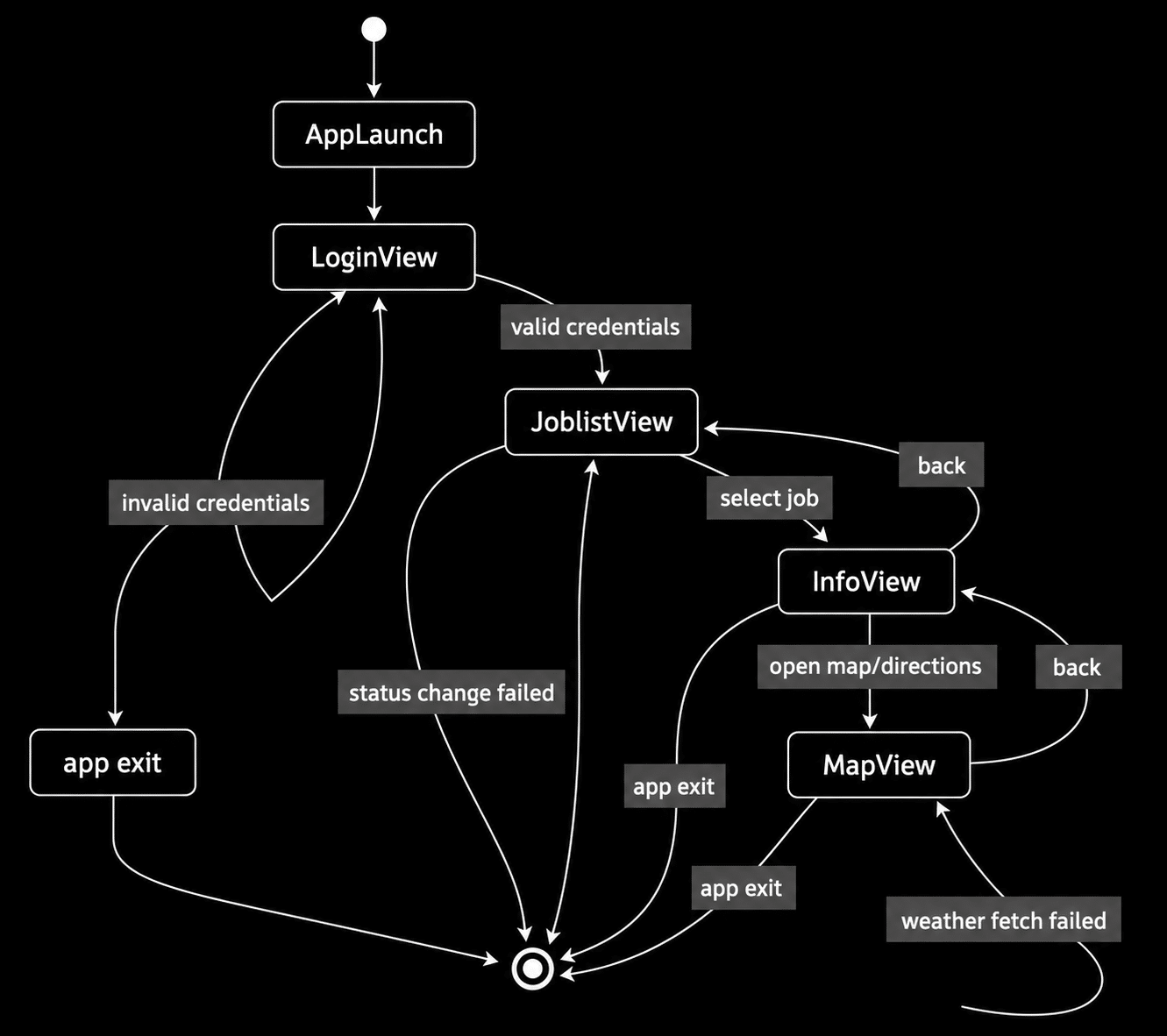
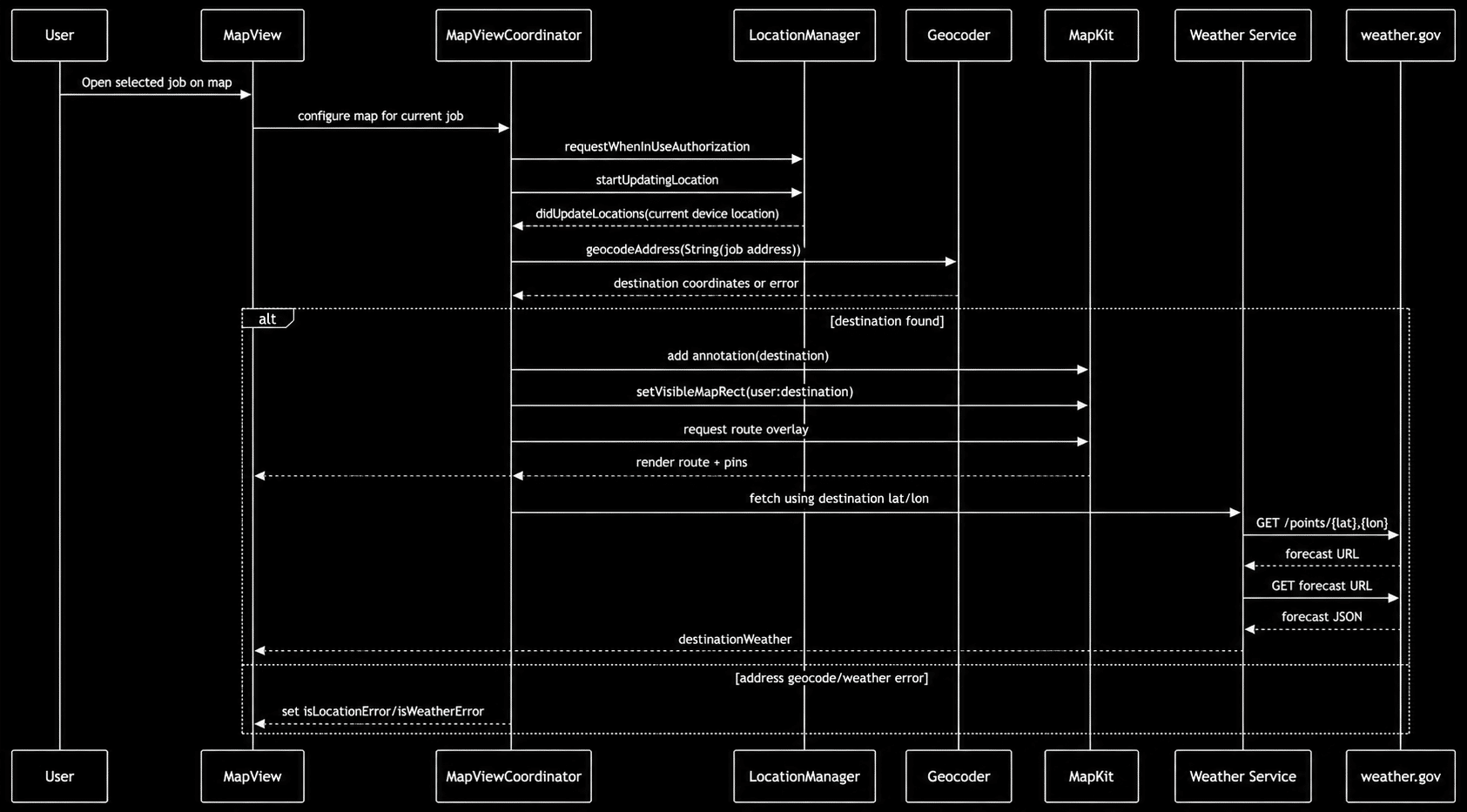
2. A prompt was used to generate a specification document for recreating the application. This produced a detailed requirements document which can be expanded by clicking the “Expanded Product Requirements Document” section below.
The generated document includes several notable recommendations, including: “Implementation Notes for Production Hardening (Post-Baseline): Replace local authentication with real backend authentication and a managed session lifecycle. Move secrets and session data to Keychain where applicable.”
Expand Product Requirements Document
Product Requirements Document: Job Dispatcher Clone (Reverse-Engineered Baseline)
1. Document Purpose
Define a complete, implementable PRD for rebuilding the analyzed iOS app as a functional clone, while clearly separating confirmed facts from unknowns not defined by the source binary.
2. Evidence Basis
This PRD is derived from Mach-O binary analysis of the app executable, app metadata from Info.plist, linked frameworks and symbols, and extracted runtime strings and class/type names.
Source code and backend contracts were not available. Some requirements are inferred and marked as gaps.
3. Confirmed Requirements by Category
3.1 Scope
iOS application named Job Dispatcher. Primary business purpose: dispatch technician jobs, show open/closed jobs, let user inspect job detail, show map routing/location context, and fetch destination weather.
Core user actions include login, viewing job lists, viewing job details, opening map and route context for a job, and toggling job status with open/closed behavior.
3.2 UX Flow
App launch enters a login-first flow. On valid credentials, the user lands in the job list. Users can filter between openJobs and closedJobs, inspect details, launch map experiences, and fetch weather context.
3.3 Architecture
SwiftUI application structure with App and View patterns. UIKit bridge via UIViewRepresentable for MapKit integration. Dedicated LocationManager and MapViewCoordinator objects support delegate-driven map behavior and observable state management.
4. Core Views
- LoginView: Handles credential input and authentication validation.
- JoblistView: Displays open and closed job collections.
- InfoView: Presents detailed job information and weather.
- MapView: Shows map routing, annotations, overlays, and user location.
5. Implementation Baseline
Build an iOS SwiftUI app targeting iOS 14+, using MapKit, CoreLocation, URLSession networking, JSON decoding, and weather.gov forecast integrations.
Implement seeded JSON jobs, local auth validation, route rendering, destination weather fetching, and error handling for login, geocoding, weather, and network failures.
6. Acceptance Criteria
- User can log in and reach job list.
- Open and closed jobs display correctly.
- Map screen requests location permission.
- Destination weather loads successfully.
- Error conditions surface clear feedback.
3. Take these diagrams and specification artifacts and spin up a new session with an empty iOS Swift application. I chose to set up a team of agents where there was a Product Manager agent orchestrating a builder agent, QA agent, and design agent. In this case, I did not take screenshots of the UI, so the AI had to choose the layouts. The PM agent took the specification and design files and built the entire clone from a single human-supplied prompt. The agents then effectively LARP’d as a real Scrum team for several hours, and by the end I had a full clone of Job Dispatcher. One of the more entertaining parts of the process was watching the PM agent create sprint plans where implementing the weather feature was estimated to take two weeks. It was reassuring to see that AI appears to be just as bad at estimating levels of effort as everyone else.
4. There are only three steps in the process, but by the end I was still surprised when I ran the application in the iOS simulator and it actually worked. Admittedly, the implementation was far from production ready. Most of the code existed in a single large file, the console generated warnings during execution, and the hardcoded credentials were set to admin/password instead of something more secure like tech/secret.
Why This Matters More Than Traditional Reverse Engineering
The obvious observation is that this attack has always been possible. What’s changed is everything that surrounds it. The traditional reverse engineering workflow required deep expertise in binary formats, disassembly, and runtime behavior. The AI-assisted workflow requires the ability to run a terminal command and write a prompt. Product managers, junior developers, and non-technical founders can now execute a meaningful reverse engineering analysis on a competitor’s app. Cloned apps can reach the market quickly. SaaS software can be reproduced instead of renewed (except ours, right?). This attack scales and seems like it will improve with newer AI models or just better prompts.
The Defense: Static Analysis Protections
The good news is that the attack described above depends entirely on the semantic richness of the binary. Remove that richness, and the AI inference chain collapses.
Symbol renaming, string encryption, control flow obfuscation, and encryption techniques build for a strong defense layer. The AI is heavily relying on the easily accessible string information to build its design diagrams. Here is a similar diagram from a version of Job Dispatcher protected with control flow obfuscation and string literal encryption.
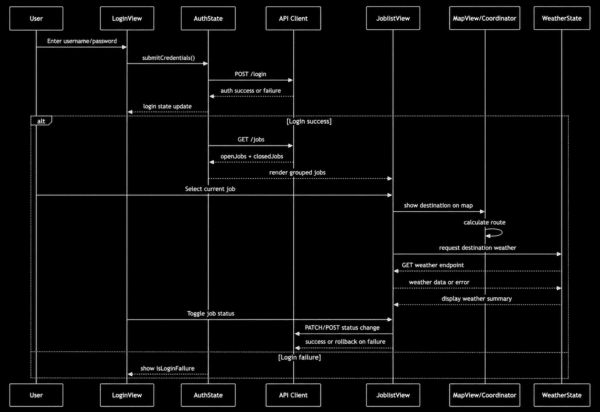
It still knows the basic views involved in the app, but it hallucinated a well-designed Job listing app. Where is my hard coded password!? The hardcoded password is my critical business logic for this app. How else could I use it for dramatic attack blogs! And I don’t even have a job list server to talk to.
Conclusion
The threat model for mobile app IP has permanently changed. AI has not created a new category of attack, but it has taken an existing one and made it accessible and scalable.
The binary you ship to the App Store is public. Every customer, every competitor, and every bad actor can download it in seconds. For most of iOS’s history, that was an acceptable risk because the cost of exploiting it was high. That cost is now negligible.
You Might Also Like

Overlay Attacks Are Draining Accounts: Why Your Mobile App Needs Application Defense
Mobile banking malware is a growing challenge for financial institutions…
$25 Skimmers: AI exploitation and exfiltration
AI is improving attackers’ ROI. You need to change the…
AI Powered Attacks Demand Application Resilience
What CISOs and AppSec leaders should do as autonomous agents…